
Nissan Murano: Storage / Console box
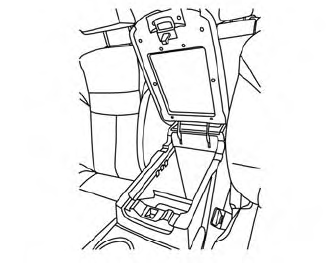
To open the console box, press in on the lever and raise the lid.
To close, push the lid down until the lock latches.
 Glove box
Open the glove box by pulling the handle.
Use the mechanical key to lock or unlock
the glove box. The valet key (if so equipped)
cannot be used to lock or unlock the glove
box...
 Overhead sunglasses storage
To open the sunglasses holder, push and
release.
Only store one pair of sunglasses in the
holder.
WARNING
Keep the sunglasses holder closed
while driving to avoid obstructing the
driver’s view and to help prevent an
accident...
Other information:
Nissan Murano (Z52) 2015-2024 Service Manual: Windshield Glass
Exploded View 1. Spacer 2. Windshield glass molding 3. Windshield glass 4. Roof 5. Headlining 6. Cowl top cover 7. Body side outer 8. Front pillar finisher D. Adhesive E. 12 mm (0.47 in) F. 7.0 mm (0.28 in) G...
Nissan Murano (Z52) 2015-2024 Service Manual: Fuel Filler Lid Release Handle
Removal and Installation REMOVALRemove fuel filler lid/hood lock release handle bolts (A). Disconnect fuel filler lid release cable (2) from fuel filler lid release handle (1). Disconnect hood lock release cable (4) from hood lock release handle (3)...
Categories
- Manuals Home
- Nissan Murano Owners Manual
- Nissan Murano Service Manual
- How to enable/disable the LDW system
- Shift lock release
- Passenger compartment
- New on site
- Most important about car

Copyright © 2026 www.nimurano.com