
Nissan Murano: Tire pressure / Checking tire pressure
Nissan Murano (Z52) 2015-2024 Owners Manual / Do-it-yourself / Wheels and tires / Tire pressure / Checking tire pressure
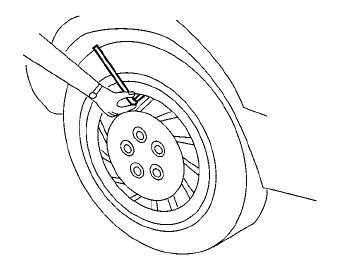
- Remove the valve stem cap from the tire.
- Press the pressure gauge squarely onto the valve stem. Do not press too hard or force the valve stem sideways, or air will escape. If the hissing sound of air escaping from the tire is heard while checking the pressure, reposition the gauge to eliminate this leakage.
- Remove the gauge.
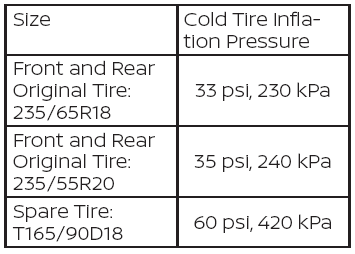
- Read the tire pressure on the gauge stem and compare to the specification shown on the Tire and Loading Information label.
- Add air to the tire as needed. If too much air is added, press the core of the valve stem briefly with the tip of the gauge stem to release pressure. Recheck the pressure and add or release air as needed.
- Install the valve stem cap.
- Check the pressure of all other tires, including the spare.
 Tire and Loading Information label
Seating capacity: The maximum
number of occupants that can
be seated in the vehicle.
Tire size - refer to “Tire
labeling” in
this section.
Cold tire pressure: Inflate the
tires to this pressure when the
tires are cold...
 Tire labeling
Example
Federal law requires tire manufacturers
to place standardized information
on the sidewall of all tires.
This information identifies and describes
the fundamental characteristics
of the tire and also provides the
Tire Identification Number (TIN) for
safety standard certification...
Other information:
Nissan Murano (Z52) 2015-2024 Owners Manual: Exterior front
..
Nissan Murano (Z52) 2015-2024 Service Manual: Warning Chime System :: Precaution. Precautions
Precaution for Supplemental Restraint System (SRS) "AIR BAG" and "SEAT BELT PRE-TENSIONER" The Supplemental Restraint System such as “AIR BAG” and “SEAT BELT PRE-TENSIONER”, used along with a front seat belt, helps to reduce the risk or severity of injury to the driver and front passenger for certain types of collisions...
Categories
- Manuals Home
- Nissan Murano Owners Manual
- Nissan Murano Service Manual
- Fuel recommendation
- GAS STATION INFORMATION
- Memory storage function (key-link)
- New on site
- Most important about car
Fuel gauge
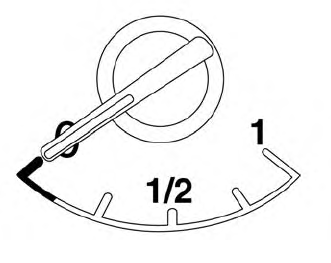
The gauge indicates the approximate fuel level in the tank.
The gauge may move slightly during braking, turning, acceleration, or going up or down hills.
The gauge needle returns to 0 (Empty) after the ignition switch is placed in the OFF position.

Copyright © 2026 www.nimurano.com