
Nissan Murano: Dtc/circuit Diagnosis / B13cf Buttons
DTC DETECTION LOGIC
| DTC No. |
CONSULT screen terms (Trouble diagnosis content) | DTC detection condition | |
|---|---|---|---|
| B13CF-73 |
Buttons (AV control unit) |
Diagnosis condition | When ignition switch is ON. |
| Signal (terminal) | — | ||
| Threshold | — | ||
| Diagnosis delay time | — | ||
POSSIBLE CAUSE
AV control unit
FAIL-SAFE
AV control unit buttons error
PERFORM DTC CONFIRMATION PROCEDURE
 CONSULT
-
Ignition switch ON.
-
Ignition switch OFF and wait at least 30 seconds.
-
Ignition switch ON and wait at least 30 seconds or more.
-
Select “Self Diagnostic Result” mode of “MULTI AV”.
-
Check DTC.
Is DTC B13CF detected?
YES>>Proceed to DTC Diagnosis Procedure.
NO>>To check malfunction symptom before repair: Refer to Intermittent Incident.
NO>>Confirmation after repair: Inspection End.
PERFORM DTC CONFIRMATION PROCEDURE AGAIN
CONSULT
-
Ignition switch ON.
-
Erase DTC.
-
Perform DTC confirmation procedure again. Refer to DTC Confirmation Procedure.
Is DTC B13CF detected again?
YES>>Replace AV control unit. Refer to Removal and Installation.
NO>>Inspection End.
 B1383 Incomp Steering Angle Sensor Adjust
DTC Description
DTC DETECTION LOGIC DTC No.
CONSULT screen terms
(Trouble diagnosis content) DTC detection condition
B1383–01
Incomp steering angle senor adjust
(Steering angle sensor calibration)
Diagnosis condition
When ignition switch is ON...
 B13ec Factory Mode
DTC Description
DTC DETECTION LOGIC DTC No.
CONSULT screen terms
(Trouble diagnosis content) DTC detection condition
B13EC–52
Factory mode
(AV control unit)
[—]
Diagnosis condition
When ignition switch is ON...
Other information:
Nissan Murano (Z52) 2015-2024 Service Manual: Preparation. Preparation
..
Nissan Murano (Z52) 2015-2024 Service Manual: P2135 Tp Sensor
DTC Description DTC DETECTION LOGICRationally incorrect voltage is sent to ECM compared with the signals from TP sensor 1 and TP sensor 2. DTC CONSULT screen terms (Trouble diagnosis content) DTC detection condition P2135 TP SENSOR-B1 (Throttle/Pedal position sensor/switch “A” / “B” voltage correlation) Diagnosis condition Start engine and let it idle Signal (terminal) TP sensor 1 signal and TP sensor 2 signal Threshold Rationally incorrect voltage is sent to ECM compared with the signals from TP sensor 1 and TP sensor 2 Diagnosis delay time — POSSIBLE CAUSE Harness or connector (TP sensor 1 or 2 circuit is open or shorted...
Categories
- Manuals Home
- Nissan Murano Owners Manual
- Nissan Murano Service Manual
- High Beam Assist (if so equipped)
- Jacking up vehicle and removing the damaged tire
- Power Steering Fluid (PSF)
- New on site
- Most important about car
Seatback pockets
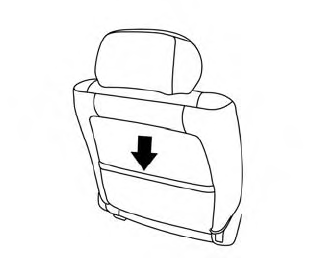
Theremaybe one or two seatback pockets located on the back of the driver and passenger seats. The pockets can be used to store maps.
WARNING
