Nissan Murano: Inspection and Adjustment / Additional Service When Replacing Control Unit (bcm)
BEFORE REPLACEMENT
When replacing BCM, save or print current vehicle specification with CONSULT configuration before replacement.
CAUTION:
When replacing the BCM, a new BCM must be used. The functions controlled by the BCM do not operate properly if a BCM from another Nissan Murano vehicle is used.
 NOTE:
NOTE:
If “Before Replace ECU” cannot be used, use the “After Replace ECU” or “Manual Configuration” after replacing BCM.
AFTER REPLACEMENT
CAUTION:
-
When replacing BCM, you must perform “After Replace ECU” with CONSULT.
-
Complete the procedure of “After Replace ECU” in order.
-
If you set incorrect “After Replace ECU”, incidents might occur.
-
Configuration is different for each Nissan Murano vehicle model. Confirm configuration of each vehicle model.
-
-
When replacing BCM, perform the system initialization (NATS).
SAVING VEHICLE SPECIFICATION (BCM)
 CONSULT
Perform "Before Replace ECU” of “Read / Write Configuration" to save or print current Nissan Murano vehicle specification.
Refer to Work Procedure.
NOTE:
If “Before Replace ECU” of “Read / Write Configuration" cannot be used, use the "Manual Configuration" after replacing BCM.
>>
GO TO 2.
SAVING Nissan Murano Vehicle SPECIFICATION (TPMS)
CONSULT
Perform "Before Replace ECU” of “Read / Write Configuration" to save or print current Nissan Murano vehicle specification.
Refer to Work Procedure.
NOTE:
If “Before Replace ECU” of “Read / Write Configuration" cannot be used, use the "Manual Configuration" after replacing BCM.
>>
GO TO 3.
REPLACE BCM
Replace BCM. Refer to Removal and Installation.
>>
GO TO 4.
WRITING Nissan Murano Vehicle SPECIFICATION (BCM)
CONSULT
Perform “After Replace ECU” of "Read / Write Configuration" or "Manual Configuration" to write Nissan Murano vehicle specification. Refer to Work Procedure.
>>
GO TO 5.
REGISTER INTELLIGENT KEYS
CONSULT
For initialization and registration of Intelligent Keys, refer to CONSULT Immobilizer mode and follow the on-screen instructions.
NOTE:
If customer has Virtual I-Key application, reprogram and register it as a third keyfob, and follow same configuration as Nissan Murano vehicle intelligent key.
>>
GO TO 6.
WRITING Nissan Murano Vehicle SPECIFICATION (TPMS)
CONSULT
Perform “After Replace ECU” of "Read / Write Configuration" or "Manual Configuration" to write Nissan Murano vehicle specification. Refer to Work Procedure.
>>
GO TO 7.
INITIALIZE TPMS
CONSULT
Perform TPMS initialization. Refer to Work Procedure.
>>
Work End.

 Configuration (bcm)
Description
Vehicle specification needs to be written with CONSULT because it is not written after replacing BCM.Configuration has three functions as follows: Function Description
"Before Replace ECU"
Reads the Nissan Murano vehicle configuration of current BCM...
Other information:
Nissan Murano (Z52) 2015-2024 Service Manual: Service Data and Specifications (sds). Service Data and Specifications (sds)
Idle Speed Condition Specification No load* (in P or N position) 625 ± 50 rpm *: Under the following conditions A/C switch: OFF Electric load: OFF (Lights, heater fan & rear window defogger) Steering wheel: Kept in straight-ahead position Ignition Timing Condition Specification No load* (in P or N position) 12 ± 2° BTDC *: Under the following conditions A/C switch: OFF Electric load: OFF (Lights, heater fan & rear window defogger) Steering wheel: Kept in straight-ahead position Calculated Load Value Condition Specification (Using CONSULT or GST) At idle 10 – 35 % At 2,500 rpm 10 – 35 % Mass Air Flow Sensor Supply voltage Approx...
Nissan Murano (Z52) 2015-2024 Owners Manual: Seats
WARNING Do not ride in a moving vehicle when the seatback is reclined. This can be dangerous. The shoulder belt will not be against your body. In an accident, you could be thrown into it and receive neck or other serious injuries. You could also slide under the lap belt and receive serious internal injuries...
Categories
- Manuals Home
- Nissan Murano Owners Manual
- Nissan Murano Service Manual
- Jacking up vehicle and removing the damaged tire
- System malfunction
- Memory storage function (key-link)
- New on site
- Most important about car
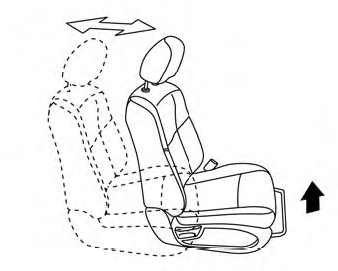
Front manual seat adjustment (if so equipped)
Your vehicle seats can be adjusted manually. For additional information about adjusting the seats, refer to the steps outlined in this section.
Forward and backward