
Nissan Murano: Basic Inspection / Action Test
Always perform the ICC system action test to check that the ICC system operates normally after replacing the distance sensor (ICC sensor) or repairing any ICC system malfunction.
CAUTION:
-
Always drive safely when performing the action test.
 NOTE:
NOTE:
-
When there is no vehicle ahead, drive at the set speed steadily.
-
When there is a Nissan Murano vehicle ahead, control to maintain distance from the vehicle ahead, watching its speed.
-
The running speed can be set between 32 km/h (20 MPH) and 144 km/h (90 MPH).
CAUTION:
Never set the cruise speed exceed the posted speed limit.
CHECK FOR MAIN SWITCH
-
Start the engine.
-
Press the MAIN switch
 (less than 1.5 seconds).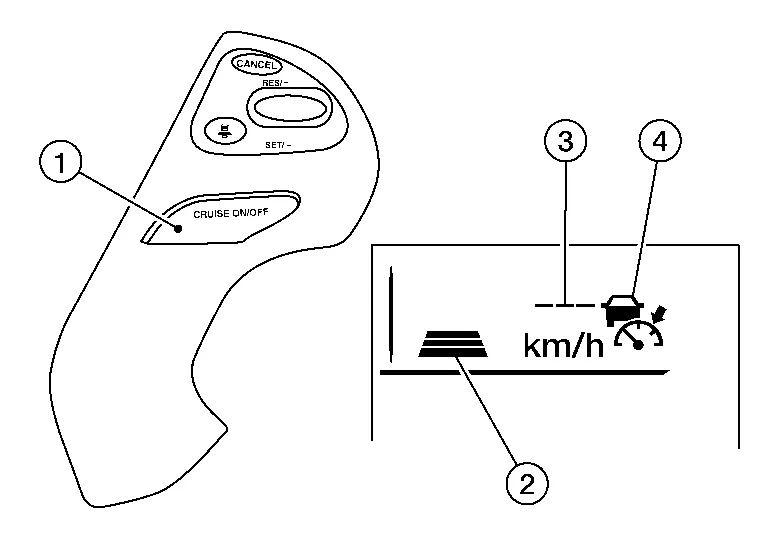
Information display status Set distance indicator 
: Long mode Set Nissan Murano vehicle speed indicator 
: “——”
“km/h” (“MPH”)MAIN switch indicator 
: ON -
Check the ICC system display on the information display to check that the Nissan Murano vehicle-to-vehicle distance control mode is ready for activation.
-
Press the MAIN switch, and check that the ICC system display on the information display turns OFF when the ICC system is deactivated.
-
Check that the ICC system display on the information display turns OFF after starting the engine again.
>>
GO TO 2.
CHECK FOR DISTANCE SWITCH
-
Start the engine.
-
Press the MAIN switch (less than 1.5 seconds).
-
Press the DISTANCE switch.
-
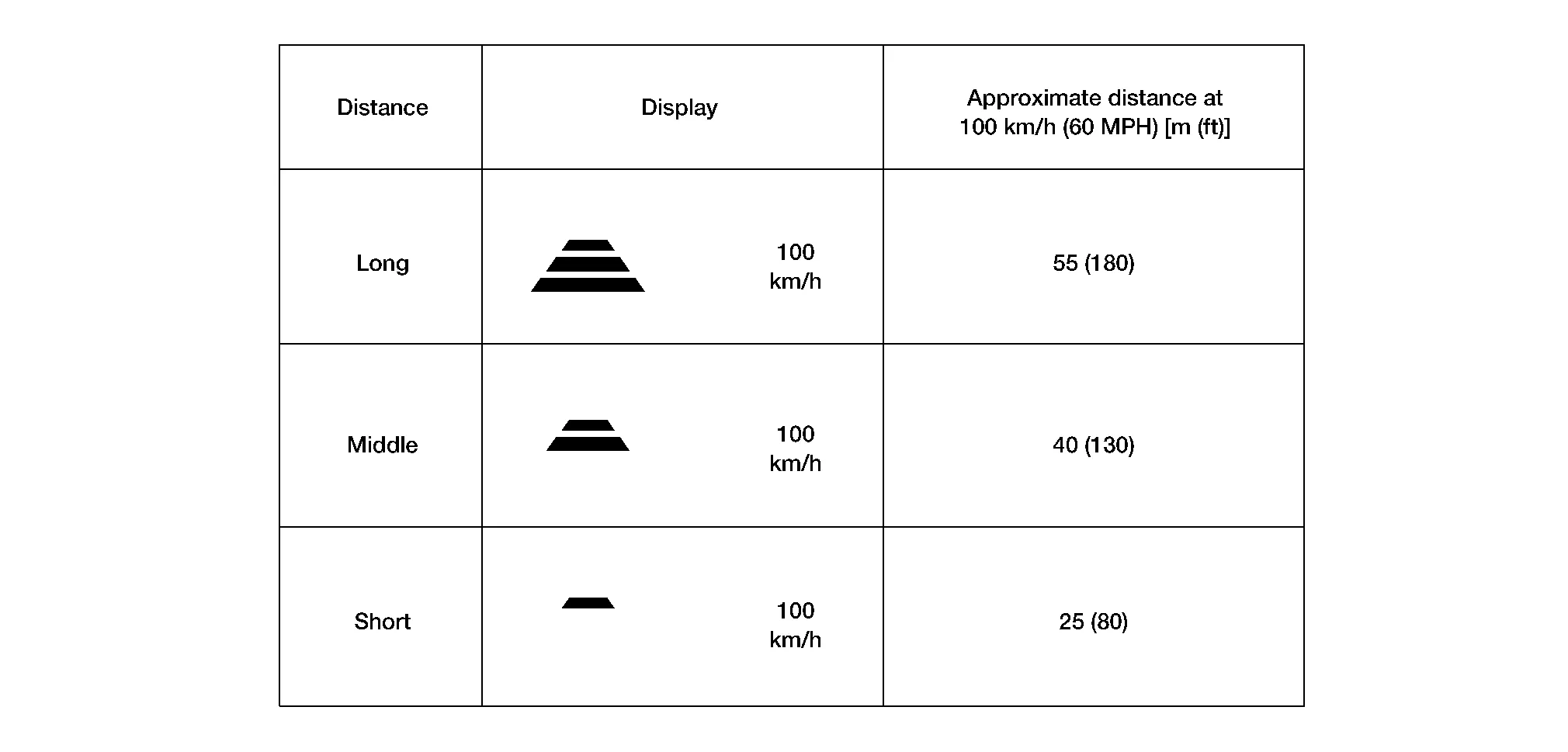
Check that the set distance indicator changes display in order of: (Long) → (Middle) → (Short).
 NOTE:
NOTE:
When the MAIN switch is turned ON, initial setting is set to (Long).
>>
GO TO 3.
CHECK FOR RES/+, SET/-, AND CANCEL SWITCHES
-
Check that RES/+, SET/-, and CANCEL switches are operated smoothly.
-
Check that switches come up as hand is released from the switches.
>>
GO TO 4.
SET CHECKING (1)
-
Start the engine.
-
Press the MAIN switch (less than 1.5 seconds) and turn the Intelligent Cruise control ON.
-
Drive the Nissan Murano vehicle at 32 km/h (20 MPH) or more.
-
Push down the SET/- switch.
-
Check that the desired speed is set and Intelligent Cruise control starts when releasing SET/- switch.
NOTE:
The set Nissan Murano vehicle speed is indicated on the set vehicle speed indicator in the ICC system display on the information display.
>>
GO TO 5.
CHECK FOR INCREASE OF CRUISING SPEED (1)
-
Set the Intelligent Cruise control at desired speed.
-
Check that the set speed increases by 1 km/h (1 MPH) as RES/+ switch is pushed up.
NOTE:
The maximum set speed of the Intelligent Cruise control is 144 km/h (90 MPH).
CAUTION:
Never set the cruise speed exceed the posted speed limit.
>>
GO TO 6.
CHECK FOR DECREASE OF CRUISING SPEED (1)
-
Set the Intelligent Cruise control at desired speed.
-
Check that the set speed decreases by 1 km/h (1 MPH) as SET/- switch is pushed down.
NOTE:
-
The minimum set speed is approximately 32 km/h (20 MPH).
-
Cancels the control automatically when the Nissan Murano vehicle speed is less than approximately 24 km/h (15 MPH) and when the system does not detect any vehicle ahead.
>>
GO TO 7.
SET CHECKING (2)
-
Stop the Nissan Murano vehicle.
-
Drive the vehicle at less than approximately 32 km/h (20 MPH).
-
Push down the SET/- switch when the system detects a Nissan Murano vehicle ahead.
-
Check that the vehicle-to-vehicle distance control mode is performed so that the Nissan Murano vehicle maintains a proper distance according to the vehicle speed [maximum: approximately 32 km/h (20 MPH)] when releasing SET/- switch.
NOTE:
-
The Intelligent Cruise control cannot be set when the Nissan Murano vehicle speed is less than 32 km/h (20 MPH) and when a vehicle ahead is not detected.
-
Cancels the control automatically when the Nissan Murano vehicle speed is 24 km/h (15 MPH) or less during the control and when the system does not detect any vehicle ahead.
-
The set Nissan Murano vehicle speed indicator in the ICC system display on the information display is set to 32 km/h (20 MPH).
>>
GO TO 8.
CHECK FOR INCREASE OF CRUISING SPEED (2)
-
Set the Intelligent Cruise control when the Nissan Murano vehicle speed is less than approximately 32 km/h (20 MPH) and when a vehicle ahead is detected.
-
Check that the set speed increases by 1 km/h (1 MPH) as RES/+ switch is pushed up.
NOTE:
The maximum set speed of the Nissan Murano vehicle-to-vehicle distance control mode is 144 km/h (90 MPH).
CAUTION:
Never set the cruise speed to exceed the posted speed limit.
>>
GO TO 9.
CHECK FOR DECREASE OF CRUISING SPEED INSPECTION (2)
-
Set the Intelligent Cruise control when the Nissan Murano vehicle speed is less than approximately 32 km/h (20 MPH) and when a vehicle ahead is detected.
-
Set the set Nissan Murano vehicle speed to the desired vehicle speed “check for increase of cruising speed”.
-
Check that the set speed decreases by 1 km/h (1 MPH) as SET/- switch is pushed down.
NOTE:
-
The minimum set speed is approximately 32 km/h (20 MPH).
-
If the Nissan Murano vehicle ahead comes to a stop, the vehicle decelerates to a standstill within the limitations of the system. The system will cancel once it judges a standstill with a warning chime.
>>
GO TO 10.
CHECK FOR CANCELLATION OF INTELLIGENT CRUISE CONTROL
Check that the Intelligent Cruise control is canceled when performing the following operations:
-
When the brake pedal is depressed after Intelligent Cruise control is set and the Nissan Murano vehicle is driven.
-
When the selector lever is in the “N” position after Intelligent Cruise control is set and the Nissan Murano vehicle is driven.
-
When the MAIN switch is turned OFF after Intelligent Cruise control is set and the Nissan Murano vehicle is driven.
-
When the CANCEL switch is pressed after Intelligent Cruise control is set and the Nissan Murano vehicle is driven.
>>
GO TO 11.
CHECK FOR RESTORING SPEED THAT IS SET BY INTELLIGENT CRUISE CONTROL BEFORE CANCELLATION
Check that the Nissan Murano vehicle restores the previous speed kept before the system deactivation when performing the following operations.:
-
Drive the Nissan Murano vehicle when the Intelligent Cruise control is set and depress the brake pedal to cancel the control. Check that the Nissan Murano vehicle restores the previous vehicle speed kept before the system deactivation when pushing up the RES/+ switch.
-
Drive the Nissan Murano vehicle when the Intelligent Cruise control is set and shift the selector lever to the “N” position to cancel the control. Check that the Nissan Murano vehicle restores the previous vehicle speed kept before the system deactivation when shifting the selector lever to the “D” position and pushing up the RESUME/+ switch.
-
Drive the Nissan Murano vehicle when the Intelligent Cruise control is set and press the CANCEL switch to cancel the control. Check that the Nissan Murano vehicle restores the previous vehicle speed kept before the system deactivation when pushing up the RESUME/+ switch.
>>
Inspection End.
 Distance Sensor (icc Sensor) Alignment
Work Procedure
Always perform the radar alignment after removing and installing or replacing the distance sensor.Application Notice Type Description
TYPE 1
When using KV99112700 for radar alignment...

Other information:
Nissan Murano (Z52) 2015-2024 Owners Manual: Vehicle-to-vehicle distance control mode switches
The system is operated by the CRUISE ON/OFF switch and four control switches, all mounted on the steering wheel. CANCEL switch:Deactivates the system without erasing the set speed. RES/+ switch:Resumes set speed or increases speed incrementally...
Nissan Murano (Z52) 2015-2024 Service Manual: B132a External Usb
DTC Description DTC DETECTION LOGIC DTC No. CONSULT screen terms (Trouble diagnosis content) DTC detection condition B132A–13 External USB (USB) [OPEN] Diagnosis condition When ignition switch is ON. Signal (terminal) — Threshold – Diagnosis delay time 30 seconds or more B132A–01 [–] Diagnosis condition When ignition switch is ON...
Categories
- Manuals Home
- Nissan Murano Owners Manual
- Nissan Murano Service Manual
- Tire rotation
- All-Wheel Drive (AWD) (if so equipped)
- GAS STATION INFORMATION
- New on site
- Most important about car
Fuel gauge
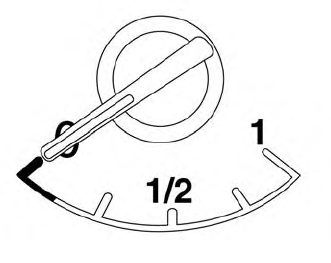
The gauge indicates the approximate fuel level in the tank.
The gauge may move slightly during braking, turning, acceleration, or going up or down hills.
The gauge needle returns to 0 (Empty) after the ignition switch is placed in the OFF position.
