
Nissan Murano: Lan System :: Can Gateway / Removal and Installation. 3ch Can Gateway
CAUTION:
Before replacing 3CH CAN gateway, perform “Before Replace ECU” of “Read / Write Configuration” to save or print current Nissan Murano vehicle specification. Refer to Description.
REMOVAL
Remove the glove box assembly and housing. Refer to Removal and Installation.
Remove the 3CH CAN gateway (1) from the bracket by sliding it as shown.
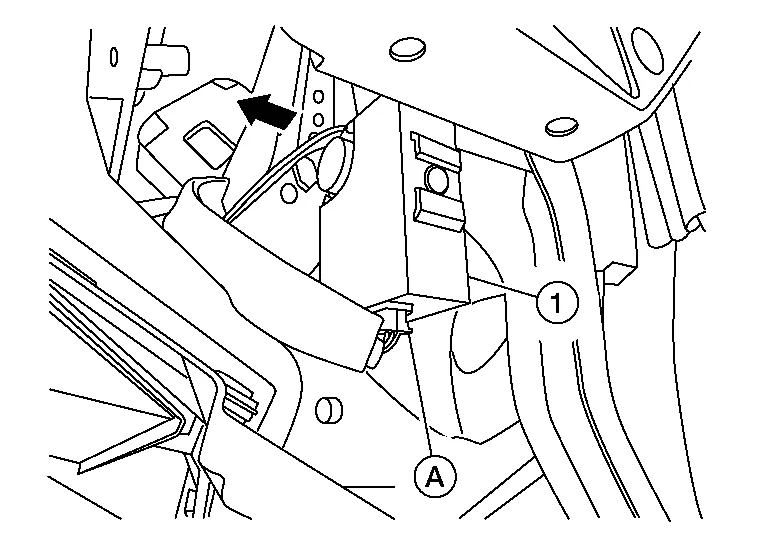
Disconnect the harness connector (A) from the 3CH CAN gateway and remove the 3CH CAN gateway.
INSTALLATION
Installation is in the reverse order of removal.
CAUTION:
To prevent malfunction, be sure to perform “After Replace ECU” of “Read / Write Configuration” or “Manual Configuration” when replacing CAN gateway. Refer to Description.
 Power Supply and Ground Circuit
Diagnosis Procedure
CHECK FUSE
Check that the following fuse are not blown.
Signal name Fuse No.
Battery power supply
25
Ignition power supply
31
Is the fuse blown (open)?
YES>>
Replace the blown fuse after repairing the affected circuit if a fuse is blown...

Other information:
Nissan Murano (Z52) 2015-2024 Service Manual: S Terminal Circuit
Diagnosis Procedure CAUTION: Perform diagnosis under the condition that engine cannot start by the following procedure: Remove fuel pump fuse. Crank or start the engine (where possible) until the fuel pressure is released. CHECK STARTER MOTOR MAGNETIC SWITCH CIRCUIT Ignition switch OFF...
Nissan Murano (Z52) 2015-2024 Service Manual: Back Door Closure Motor
Diagnosis Procedure CHECK BACK DOOR CLOSURE MOTOR INPUT SIGNAL Ignition switch OFF. Disconnect back door lock assembly connector. Check voltage between back door lock assembly harness connector and ground. (+) (–) Condition Voltage (Approx...
Categories
- Manuals Home
- Nissan Murano Owners Manual
- Nissan Murano Service Manual
- Warning lights
- Tire rotation
- Fuel recommendation
- New on site
- Most important about car
Seatback pockets

Theremaybe one or two seatback pockets located on the back of the driver and passenger seats. The pockets can be used to store maps.
WARNING
