
Nissan Murano: Push-button ignition switch / NISSAN Intelligent Key® battery discharge
Nissan Murano (Z52) 2015-2024 Owners Manual / Starting and driving / Push-button ignition switch / NISSAN Intelligent Key® battery discharge
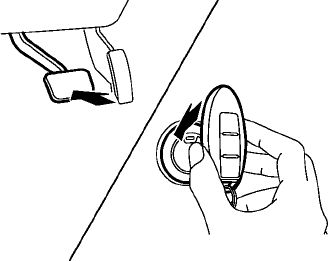
If the battery of the NISSAN Intelligent Key® is discharged, or environmental conditions interfere with the Intelligent Key operation, start the engine according to the following procedure:
- Place the shift lever in the P (Park) position.
- Firmly apply the foot brake.
- Touch the ignition switch with the Intelligent
Key as illustrated. (A chime will
sound.)
(After step 3 is performed, when the ignition switch is pushed without depressing the brake pedal, the ignition switch position will change to ON.)
- Push the ignition switch while depressing the brake pedal within 10 seconds after the chime sounds. The engine will start.
NOTE:
- When the ignition switch is pushed to the ON position or the engine is started by the above procedure, the Intelligent Key battery discharge indicator appears in the vehicle information display even when the Intelligent Key is inside the vehicle. This is not a malfunction. To turn off the Intelligent Key battery discharge indicator, touch the ignition switch with the Intelligent Key again.
- If the Intelligent Key battery discharge indicator appears, replace the battery as soon as possible. For additional information, refer to “Battery replacement” in the “Do-it-yourself” section of this manual.
 Emergency engine shut off
To shut off the engine in an emergency
situation while driving, perform the following
procedure:
Rapidly push the ignition switch three
consecutive times in less than 1...
 NISSAN Vehicle Immobilizer System
The NISSAN Vehicle Immobilizer System
will not allow the engine to start without
the use of the registered key.
If the engine fails to start using a registered
key (for example, when interference is
caused by another registered key, an automated
toll road device or automatic payment
device on the key ring), restart the
engine using the following procedure:
Leave the ignition switch in the ON position
for approximately 5 seconds...
Other information:
Nissan Murano (Z52) 2015-2024 Service Manual: Intelligent Key System Symptoms
Diagnosis Procedure NOTE: Perform the self diagnosis result with CONSULT before the symptom diagnosis. Perform the trouble diagnosis if any DTC is detected. SYMPTOM TABLE 1 (BOTH INTELLIGENT KEYS HAVE THE SAME SYMPTOMS) No. Door lock operation (remote keyless entry) Door lock operation (request switch) or back door open operation (opener switch of back door panel) Engine started with ignition switch operation (registered Intelligent Key is within the detection area of inside key antenna) Engine started with ignition switch operation (registered Intelligent Key placed next to ignition switch) Symptom 1 OK OK No start No start Diagnosis Procedure 2 OK NG OK OK Diagnosis Procedure 3 OK NG No crank, No start OK Diagnosis Procedure 4 NG NG No crank, No start OK Diagnosis Procedure 5 NG NG No start No start Diagnosis Procedure 6 OK OK No crank, No start OK Diagnosis Procedure 7 NG OK OK OK Diagnosis Procedure 8 NG NG OK OK Diagnosis Procedure 9 Poor range OK OK OK Diagnosis Procedure SYMPTOM TABLE 2 (ONE INTELLIGENT KEY HAS THE SYMPTOM, OTHER KEYS OPERATE NORMALLY) No...
Nissan Murano (Z52) 2015-2024 Service Manual: C1b55-00 Radar Blockage
DTC Description DTC DETECTION LOGIC DTC No. CONSULT screen terms (Trouble diagnosis content) DTC detection condition C1B55-00 RADAR BLOCKAGE (Radar blockage) Diagnosis condition When ignition switch is ON. Signal (terminal) – Threshold Side radar is blocked Diagnosis delay time – NOTE: DTC “C1B55-00” may be detected under the following conditions except for possible cause...
Categories
- Manuals Home
- Nissan Murano Owners Manual
- Nissan Murano Service Manual
- All-Wheel Drive (AWD) (if so equipped)
- GAS STATION INFORMATION
- Rear bench seat adjustment
- New on site
- Most important about car

Copyright © 2026 www.nimurano.com