Nissan Murano: Maintenance / Maintenance :: Precaution. Precautions
The Supplemental Restraint System such as “AIR BAG” and “SEAT BELT PRE-TENSIONER”, used along with a front seat belt, helps to reduce the risk or severity of injury to the driver and front passenger for certain types of collisions.
Information necessary to service the system safely is included in the “SRS AIR BAG” and “SEAT BELT” sections of this Service Manual.
WARNING:
Always observe the following items for preventing accidental activation:
-
To avoid rendering the SRS inoperative, which could increase the risk of personal injury or death in the event of a collision that would result in air bag inflation, it is recommended that all maintenance and repair be performed by an authorized NISSAN/INFINITI dealer.
-
Improper repair, including incorrect removal and installation of the SRS, can lead to personal injury caused by unintentional activation of the system. For removal of Spiral Cable and Air Bag Module, see “SRS AIR BAG”.
-
Never use electrical test equipment on any circuit related to the SRS unless instructed to in this Service Manual. SRS wiring harnesses can be identified by yellow and/or orange harnesses or harness connectors.
PRECAUTIONS WHEN USING POWER TOOLS (AIR OR ELECTRIC) AND HAMMERS
WARNING:
Always observe the following items for preventing accidental activation:
-
When working near the Air Bag Diagnosis Sensor Unit or other Air Bag System sensors with the ignition/power switch ON or engine running, never use air or electric power tools or strike near the sensor(s) with a hammer. Heavy vibration could activate the sensor(s) and deploy the air bag(s), possibly causing serious injury.
-
When using air or electric power tools or hammers, always switch the ignition/power switch OFF, disconnect the 12V battery or batteries, and wait at least 3 minutes before performing any service.
 Maintenance
..
 Maintenance :: Preparation. Preparation
Special Service Tool
The actual shape of the tools may differ from those illustrated here.
Tool number
(TechMate No.)
Tool name Description
—
(J-48891)
Spark plug socket
Removing and installing spark plug
—
(J-51771)
Cooling system pressure test kit
—
(J-51771-1)
Main body
—
(J-51771-4)
Small adapter
—
(J-51771-5)
Pump with quick release
—
(J-51771-9)
Radiator cap assembly with quick coupler
Checking cooling system and radiator cap
KV991J0070
(J-45695-A)
Coolant Refill Tool
Refilling engine cooling system
(J-43926)
Refrigerant dye leak detection kit
Kit includes:
UV lamp and UV safety goggles
Refrigerant dye injector
Fluorescent leak detection dye (box of 24, 1/4 ounce bottles)
Refrigerant dye cleaner
Power supply:
DC 12V (battery terminal)
(J-52990)
Fluorescent Oil Dye
(TIFZX)
Electronic Refrigerant Leak Detector
Detects refrigerant leaks
KV311039S0
( — )
Charging pipe set
KV31103920*
( — )
O-ring
CVT fluid changing and adjustment
( — )
(J-52584)
CVT stand pipe adapter kit
CVT fluid changing and adjustment
(—)
(J-51155)
CVT8 fluid level quick check gauge
Checking CVT fluid level
( — )
(J-52611)
CVT charge pipe cap release tool
Removing CVT charge pipe cap
Commercial Service Tool
(TechMate No...
Other information:
Nissan Murano (Z52) 2015-2024 Service Manual: Linking Key Fob to the Meter Display
System Description SYSTEM DIAGRAMSIGNAL TRANSMISSION FUNCTION LISTSeveral types of signals are transmitted from the following units to the driver seat control unit via CAN communication. Component Signal ABS actuator and electric unit (control unit) Nissan Murano Vehicle speed signal Combination meter Vehicle speed signal BCM Ignition switch signal Key ID signal Key link signal Log-in permit signal TCM Shift position signal AV control unit User information signal IPDM E/R Detention switch signal DESCRIPTIONLog-in function is the function that registers the setting status of various systems and retrieves the status for each Intelligent Key as desired...
Nissan Murano (Z52) 2015-2024 Service Manual: Component Parts. Power Window System
Component Parts Location A. View with front door finisher removed B. View with rear door finisher removed No. Component Function 1. BCM (Body Control Module) Supplies power to the window switches. Controls retained power. Refer to Component Parts Location for detailed component location...
Categories
- Manuals Home
- Nissan Murano Owners Manual
- Nissan Murano Service Manual
- Turning the AEB system on/off
- Intelligent Forward Collision Warning (I-FCW)
- Warning lights
- New on site
- Most important about car
Unfastening the seat belts. Checking seat belt operation
Unfastening the seat belts
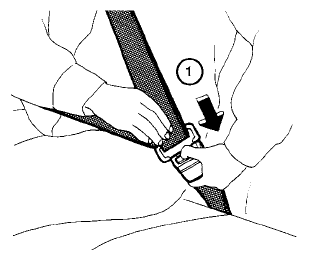
To unfasten the seat belt, press the button
on the buckle  . The seat belt
automatically
retracts.
