
Nissan Murano: Instrument Panel :: Removal and Installation / Glove Box Assembly and Housing
REMOVAL
Remove glove box assembly screws (A).
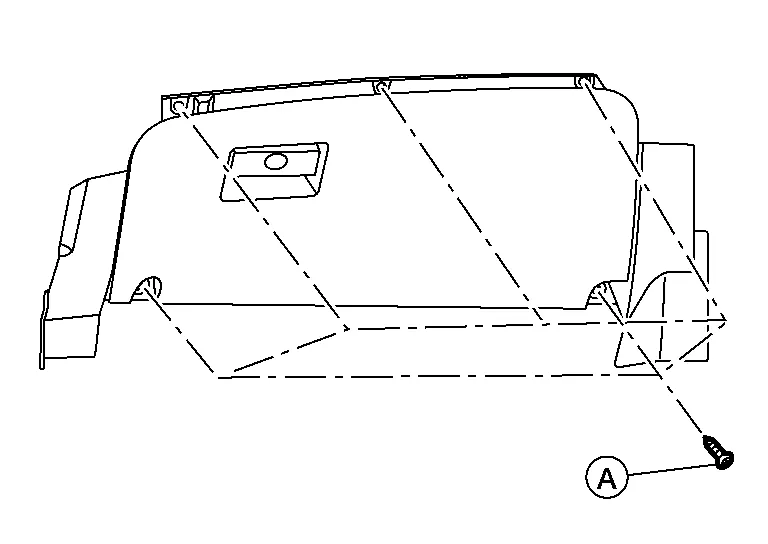
 NOTE:
NOTE:
Open glove box lid to access upper screws.
Using a suitable tool, release clips.
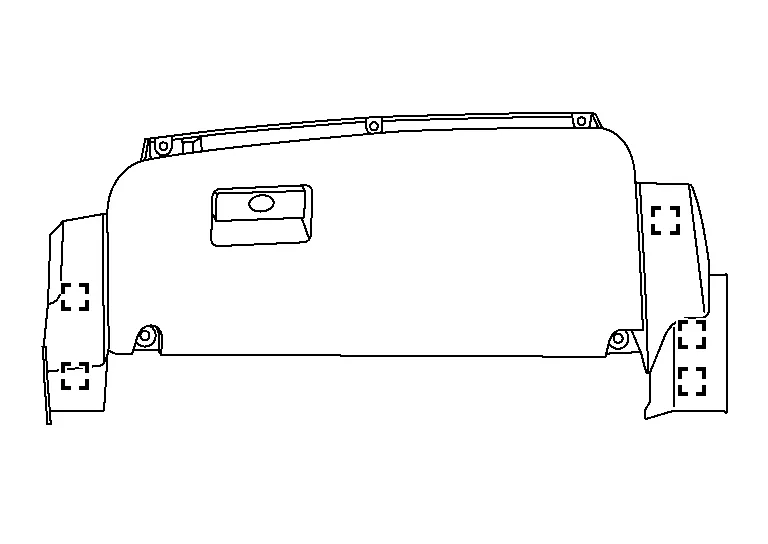
 : Metal clip
Disconnect harness connectors from glove box assembly.
Remove glove box assembly.
INSTALLATION
Installation is in the reverse order of removal.
 Instrument Lower Panel Lh
Removal and Installation
WARNING:
Before servicing the SRS, turn ignition switch OFF, disconnect both battery terminals then wait at least three minutes...

Other information:
Nissan Murano (Z52) 2015-2024 Service Manual: Oil Seal
Removal and Installation of Valve Oil Seal REMOVALTurn crankshaft until the cylinder requiring new oil seals is at TDC. This will prevent valve from dropping into cylinder. CAUTION: When rotating crankshaft, be careful to avoid scarring the front cover with the timing chain...
Nissan Murano (Z52) 2015-2024 Service Manual: U0102 Lost Communication (transfer)
DTC Description DTC DETECTION LOGICWhen the ignition switch is ON, TCM is unable to receive the CAN communications signal from AWD control unit continuously for 2 seconds or more. DTC CONSULT screen terms (Trouble diagnosis content) DTC detection condition U0102 LOST COMM (TRANSFER) (Lost Communication With Transfer Case Control Module) Diagnosis condition When the ignition switch is ON Signal CAN communication signal Threshold TCM is unable to receive the CAN communications signal from AWD control unit Diagnosis delay time Continuously for 2 seconds or more POSSIBLE CAUSE AWD control unit Harness or connector (CAN communication line is open or shorted) FAIL-SAFENot changed from normal driving DTC Confirmation Procedure PREPARATION BEFORE WORK If another “DTC CONFIRMATION PROCEDURE” occurs just before, turn ignition switch OFF and wait for at least 10 seconds, then perform the next test...
Categories
- Manuals Home
- Nissan Murano Owners Manual
- Nissan Murano Service Manual
- Passenger compartment
- High Beam Assist (if so equipped)
- Warning lights
- New on site
- Most important about car
Driver and passenger supplemental knee air bag

Driver’s side
The knee air bag is located in the knee bolster, on the driver’s and passenger’s side. All of the information, cautions and warnings in this manual apply and must be followed. The knee air bag is designed to inflate in higher severity frontal collisions, although it may inflate if the forces in another type of collision are similar to those of a higher severity frontal impact. It may not inflate in certain collisions.

Passenger’s side
