
Nissan Murano: Road Wheels & Tires :: Dtc/circuit Diagnosis / C1729 Vhcl Speed Sig Err
 NOTE:
NOTE:
The Signal Tech II Tool [– (J-50190)] can be used to perform the following functions: Refer to the Signal Tech II User Guide for additional information.
-
Activate and display TPMS sensor IDs
-
Display tire pressure reported by the TPMS sensor
-
Read TPMS DTCs
-
Register TPMS sensor IDs
DTC DETECTION LOGIC
| DTC No. |
CONSULT screen terms (Trouble diagnosis content) | DTC detection condition | |
|---|---|---|---|
| C1729 |
VHCL SPEED SIG ERR (Nissan Murano Vehicle speed sensor error) |
Diagnosis condition | When ignition switch ON. |
| Signal (terminal) | Nissan Murano Vehicle speed signal (—). | ||
| Threshold | Nissan Murano Vehicle speed signal is not detected. | ||
| Diagnosis delay time | — | ||
POSSIBLE CAUSE
-
CAN communication
-
Combination meter
-
BCM
FAIL-SAFE
—
PERFORM SELF DIAGNOSTIC RESULT
 CONSULT
-
Drive at a speed of 25 MPH (40 km/h) or more for 3 minutes, and then drive the Nissan Murano vehicle at any speed for 10 minutes.
-
Select “Self Diagnostic Result” mode of "BCM(AIR PRESSURE MONITOR)".
-
Check DTC.
Is DTC C1729 detected?
YES>>Refer to DTC Diagnosis Procedure.
NO>>Inspection End.
NOTE:
The Signal Tech II Tool [– (J-50190)] can be used to perform the following functions: Refer to the Signal Tech II User Guide for additional information.
-
Activate and display TPMS sensor IDs
-
Display tire pressure reported by the TPMS sensor
-
Read TPMS DTCs
-
Register TPMS sensor IDs
PERFORM SELF DIAGNOSTIC RESULT FOR COMBINATION METER
CONSULT
Select “Self Diagnostic Result” mode of “METER M&A”. Refer to Diagnosis Description.
Are any DTCs detected?
YES>>Refer to DTC Index.
NO>>GO TO 2.
CHECK BCM INPUT/OUTPUT SIGNAL
Check BCM input/output signal values. Refer to Reference Value.
Is the inspection result normal?
YES>>Check pin terminal and connection of each harness connector for malfunctioning conditions.
NO>>Replace the BCM. Refer to Removal and Installation.
 C1708 [no Data] Fl
DTC Description
NOTE:
The Signal Tech II Tool [– (J-50190)] can be used to perform the following functions: Refer to the Signal Tech II User Guide for additional information...
 C1734 Control Unit
DTC Description
NOTE:
The Signal Tech II Tool [– (J-50190)] can be used to perform the following functions: Refer to the Signal Tech II User Guide for additional information...
Other information:
Nissan Murano (Z52) 2015-2024 Service Manual: Power Supply and Ground Circuit. Av Control Unit
Diagnosis Procedure CHECK FUSE Check that the following fuses are not blown: Terminal No. Signal name Fuse No. Capacity 7 ACC power supply 7 10 A 17 Ignition power supply 29 10 A 19 Battery power supply 15 20 A Are the fuses blown? YES>> Replace the blown fuse after repairing the affected circuit...
Nissan Murano (Z52) 2015-2024 Service Manual: Precaution. Precautions
Precaution for Supplemental Restraint System (SRS) "AIR BAG" and "SEAT BELT PRE-TENSIONER" The Supplemental Restraint System such as “AIR BAG” and “SEAT BELT PRE-TENSIONER”, used along with a front seat belt, helps to reduce the risk or severity of injury to the driver and front passenger for certain types of collisions...
Categories
- Manuals Home
- Nissan Murano Owners Manual
- Nissan Murano Service Manual
- All-Wheel Drive (AWD) (if so equipped)
- Fuel recommendation
- High Beam Assist (if so equipped)
- New on site
- Most important about car
Autolight system
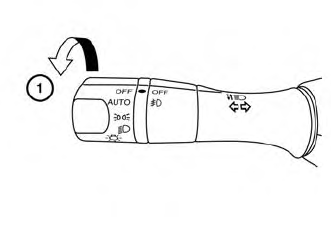
The autolight system allows the headlights to turn on and off automatically. The autolight system can:
Turn on the headlights, front parking, tail, license plate and instrument panel lights automatically when it is dark. Turn off all the lights (except daylight running lights) when it is light. Keep all the lights on for a period of time after you place the ignition switch in the OFF position and all doors are closed.