
Nissan Murano: Road Wheels & Tires :: Dtc/circuit Diagnosis / C1708 [no Data] Fl
 NOTE:
NOTE:
The Signal Tech II Tool [– (J-50190)] can be used to perform the following functions: Refer to the Signal Tech II User Guide for additional information.
-
Activate and display TPMS sensor IDs
-
Display tire pressure reported by the TPMS sensor
-
Read TPMS DTCs
-
Register TPMS sensor IDs
DTC DETECTION LOGIC
| DTC No. |
CONSULT screen terms (Trouble diagnosis content) | DTC detection condition | |
|---|---|---|---|
| C1708 |
[NO DATA] FL (No data front left) |
Diagnosis condition | When ignition switch ON. |
| Signal (terminal) |
|
||
| Threshold | Tire pressure data signal from the front LH wheel tire pressure sensor cannot be detected. | ||
| Diagnosis delay time | — | ||
POSSIBLE CAUSE
-
Driving in area with radio interference.
-
ID registration incomplete
-
Tire pressure sensor
-
Harness or connectors
-
Remote keyless entry receiver
-
BCM
FAIL-SAFE
—
PERFORM SELF DIAGNOSTIC RESULT
 CONSULT
-
Perform tire pressure sensor ID registration. Refer to Work Procedure.
-
Drive at a speed of 25 MPH (40 km/h) or more for 3 minutes, and then drive the Nissan Murano vehicle at any speed for 10 minutes.
NOTE:
Avoid driving in areas with radio interference.
-
Select “Self Diagnostic Result” mode of "BCM(AIR PRESSURE MONITOR)".
-
Check DTC.
Is DTC C1708 detected?
YES>>Refer to DTC Diagnosis Procedure.
NO>>Inspection End.
NOTE:
The Signal Tech II Tool [– (J-50190)] can be used to perform the following functions: Refer to the Signal Tech II User Guide for additional information.
-
Activate and display TPMS sensor IDs
-
Display tire pressure reported by the TPMS sensor
-
Read TPMS DTCs
-
Register TPMS sensor IDs
CHECK TIRE PRESSURE SIGNAL
CONSULT
-
Select “Data Monitor” mode of "BCM(AIR PRESSURE MONITOR)”.
-
Check that the air pressures match the specified value.
Monitor item Displayed value AIR PRESS FL Approximately equal to specified value. Refer to Tire Air Pressure. AIR PRESS FR AIR PRESS RR AIR PRESS RL
Are all tire pressures displayed 0 psi (kPa)?
YES>>GO TO 2.
NO>>Replace applicable tire pressure sensor. Refer to Removal and Installation.
CHECK REMOTE KEYLESS ENTRY RECEIVER POWER CIRCUIT
Check voltage between remote keyless entry receiver harness connector and ground.
| (+) | (—) |
Voltage (Approx.) | |
|---|---|---|---|
| Remote keyless entry receiver | |||
| Connector | Terminal | ||
| M86 | 1 | Ground | Battery voltage |
Is the inspection result normal?
YES>>GO TO 3.
NO>>Repair or replace harness or connectors.
CHECK REMOTE KEYLESS ENTRY RECEIVER SIGNAL
-
Ignition switch ON.
-
Check signal between remote keyless entry receiver harness connector and ground with an oscilloscope.
(+) (—) Condition Voltage
(Approx.)Remote keyless entry receiver Connector Terminal M86 2 Ground Standby state 
When receiving the signal from the tire pressure sensor 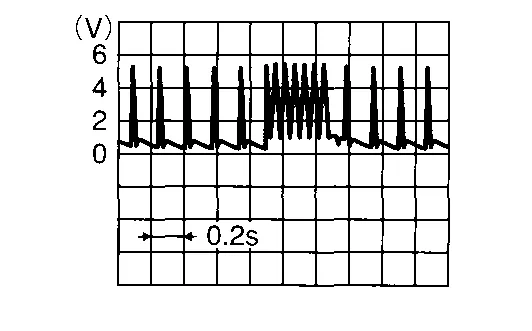
Is the inspection result normal?
YES>>GO TO 6.
NO>>GO TO 4.
CHECK REMOTE KEYLESS ENTRY RECEIVER SIGNAL CIRCUIT
-
Ignition switch OFF.
-
Disconnect BCM connector and remote keyless entry receiver connector.
-
Check continuity between BCM harness connector and remote keyless entry receiver harness connector.
BCM Remote keyless entry receiver Continuity Connector Terminal Connector Terminal M80 119 M86 2 Yes -
Check continuity between BCM harness connector and ground.
BCM — Continuity Connector Terminal M80 119 Ground No
Is the inspection result normal?
YES>>GO TO 5.
NO>>Repair or replace harness or connectors.
CHECK REMOTE KEYLESS ENTRY RECEIVER GROUND CIRCUIT
Check continuity between remote keyless entry receiver harness connector and ground.
| Remote keyless entry receiver | — | Continuity | |
|---|---|---|---|
| Connector | Terminal | ||
| M86 | 3 | Ground | Yes |
Is the inspection result normal?
YES>>Replace the remote keyless entry receiver. Refer to Removal and Installation.
NO>>Repair or replace harness or connectors.
TIRE PRESSURE SENSOR ID REGISTRATION
Perform tire pressure sensor ID registration. Refer to Work Procedure.
Can the tire pressure sensor ID registration be completed?
YES>>GO TO 7.
NO>>Replace applicable tire pressure sensor. Refer to Removal and Installation.
RECHECK TIRE PRESSURE SIGNAL
CONSULT
-
Drive at a speed of 25 MPH (40 km/h) or more for 3 minutes, and then drive the Nissan Murano vehicle at any speed for 10 minutes.
-
Select “Data Monitor” mode of "BCM(AIR PRESSURE MONITOR)”.
-
Check that the air pressures match the specified value.
Monitor item Displayed value AIR PRESS FL Approximately equal to specified value. Refer to Tire Air Pressure. AIR PRESS FR AIR PRESS RR AIR PRESS RL
Does Data Monitor display specified value without turning tire pressure warning lamp ON?
YES>>Inspection End.
NO>>Replace BCM. Refer to Removal and Installation.
 C1704 Low Pressure Fl
DTC Description
NOTE:
The Signal Tech II Tool [– (J-50190)] can be used to perform the following functions: Refer to the Signal Tech II User Guide for additional information...
 C1729 Vhcl Speed Sig Err
DTC Description
NOTE:
The Signal Tech II Tool [– (J-50190)] can be used to perform the following functions: Refer to the Signal Tech II User Guide for additional information...
Other information:
Nissan Murano (Z52) 2015-2024 Owners Manual: System malfunction
If the TSR system malfunctions, it will be turned off automatically and the LDW indicator (orange) will illuminate in the vehicle information display. Action to take: If the LDW indicator (orange) illuminates in the display, pull off the road at a safe location and stop the vehicle...
Nissan Murano (Z52) 2015-2024 Service Manual: Keyless Power Window Down Does Not Operate
Diagnosis Procedure CHECK REMOTE KEYLESS ENTRY FUNCTION Check remote keyless entry function. Is the inspection result normal? YES>> GO TO 2. NO>> Refer to Diagnosis Procedure. CHECK POWER WINDOW OPERATION Check power window operation. In the inspection result normal? YES>> GO TO 3...
Categories
- Manuals Home
- Nissan Murano Owners Manual
- Nissan Murano Service Manual
- Rear bench seat adjustment
- Power Steering Fluid (PSF)
- GAS STATION INFORMATION
- New on site
- Most important about car
Unfastening the seat belts. Checking seat belt operation
Unfastening the seat belts

To unfasten the seat belt, press the button
on the buckle  . The seat belt
automatically
retracts.
. The seat belt
automatically
retracts.
