
Nissan Murano: Front Disc Brake / Brake Pad
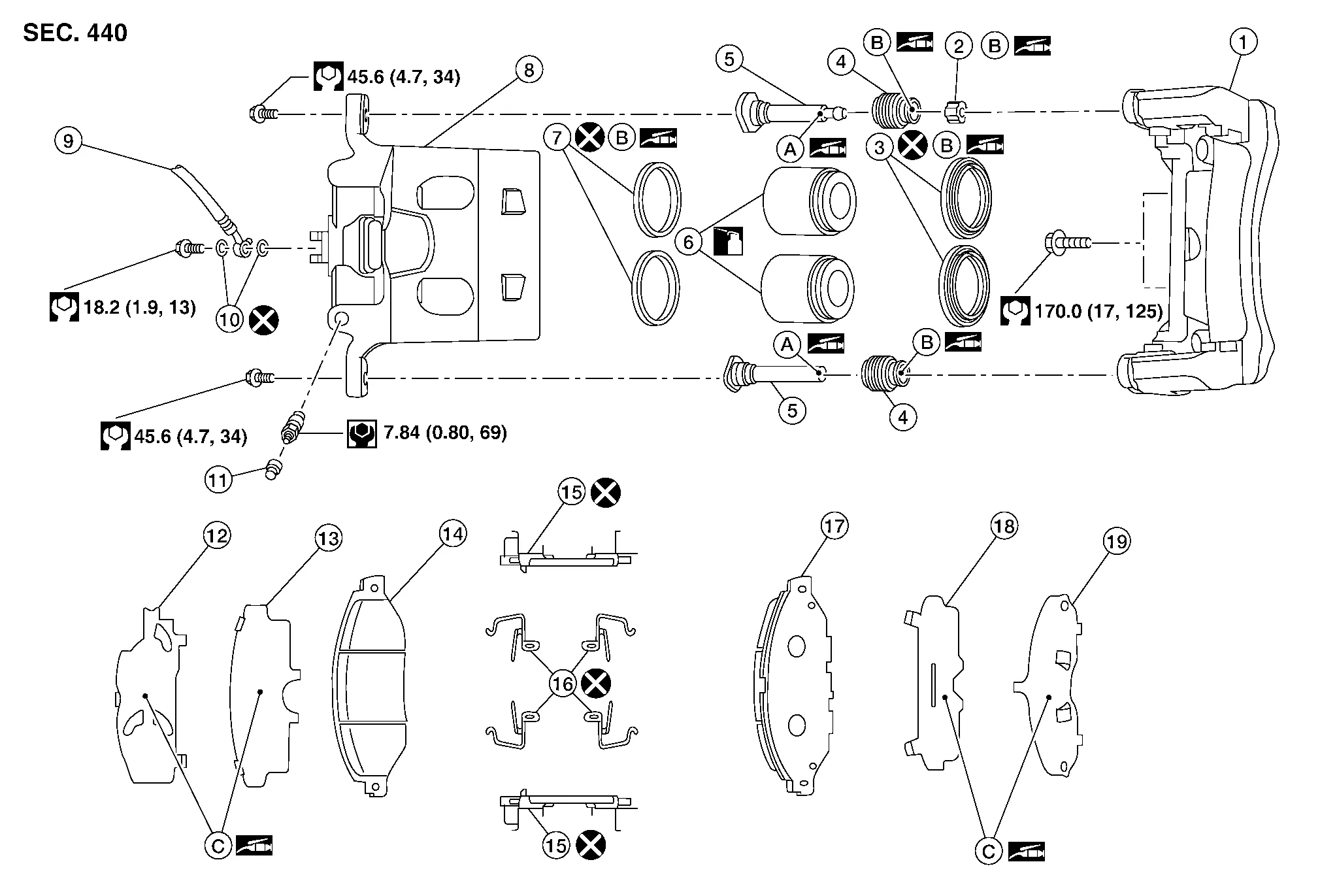
| 1. | Torque member | 2. | Bushing | 3. | Piston boot |
| 4. | Slide pin boot | 5. | Slide pin | 6. | Piston |
| 7. | Piston seal | 8. | Brake caliper body | 9. | Brake hose |
| 10. | Copper sealing washers | 11. | Bleeder cap | 12. | Inner shim cover |
| 13. | Inner shim | 14. | Inner pad | 15. | Pad retainer |
| 16. | Anti-rattle clip | 17. | Outer pad | 18. | Outer shim |
| 19. | Outer shim cover | A. | Nigrove Rx-2 | B. | Rubber grease |
| C. | Molykote® AS-880N | ||||
 : Apply brake fluid. : Apply brake fluid. |
|||||
REMOVAL
WARNING:
Clean dust on brake caliper and brake pad with a vacuum dust collector to minimize the hazards of airborne particles or other material.
CAUTION:
-
Do not depress the brake pedal while removing the brake pads because the pistons may pop out.
-
It is not necessary to remove bolts on torque member and brake hose except for disassembly or replacement of brake caliper. For brake pad removal, hang brake caliper with a wire so as not to stretch brake hose.
-
If brake fluid or grease adheres to the brake caliper or disc brake rotor, quickly wipe it off.
-
Do not reuse drained brake fluid.
Observe brake fluid level in the sub tank. Partially drain brake fluid if necessary. Refer to Drain and Refill.
Remove the front wheels and tires using power tool.
Remove slide pin bolts.
Remove the brake caliper from the torque member. Leaving brake hose attached, reposition the brake caliper aside with wire.
Remove the brake pads, shims, shim covers, pad retainers, and anti-rattle clips from the torque member.
CAUTION:
-
Do not reuse the pad retainers and anti-rattle clips.
-
Do not damage the piston boot.
-
Do not drop the brake pads, shims, or the shim covers.
-
Note the position of components during removal to aid with installation.
Compress the front caliper pistons.
INSTALLATION
Install the new pad retainers and anti-rattle clips to the torque member.
CAUTION:
-
Do not reuse the pad retainers and anti-rattle clips.
-
Do not deform the pad retainers.
-
Verify that the pad retainers are secured properly to the torque member.
Apply Molykote® AS-880N grease to the mating faces between the inner shim, inner shim cover, outer shim and outer shim cover and install them to the brake pad. Refer to Exploded View.
CAUTION:
When installing new brake pads, replace the shims and shim covers.
Install the brake pads to the torque member.
Using a suitable tool, press the pistons into the brake caliper.
CAUTION:
Do not damage the piston boot.
Install the brake caliper to the torque member.
Install the slide pin bolts and tighten to specification. Refer to Exploded View.
Depress the brake pedal several times and verify that drag does not exist.
Install the front wheels and tires. Refer to Removal and Installation.
Check brake fluid level and refill as necessary. Refer to Inspection.
INSPECTION AFTER INSTALLATION
Check the drag of front disc brake. If any drag is found, follow the procedure described below.
Remove brake pads.
Using a suitable tool, press the pistons into the brake caliper body.
CAUTION:
Do not damage the piston boots.
Install brake pads.
Depress the brake pedal several times.
Check the drag of front disc brake again. If any drag is found, disassemble the brake caliper body.
Burnish contact surfaces after refinishing or replacing disc brake rotors or if a soft pedal occurs at very low mileage. Refer to Brake Pedal.

 Brake Caliper Assembly
Exploded View
1.
Torque member
2.
Bushing
3.
Piston boot
4.
Slide pin boot
5.
Slide pin
6.
Piston
7.
Piston seal
8.
Brake caliper body
9...
Other information:
Nissan Murano (Z52) 2015-2024 Service Manual: The Low Washer Fluid Warning Continues Displaying, or Does Not Display
Diagnosis Procedure The warning is still displayed even after washer fluid is added. The warning is not displayed even though the washer tank is empty. CHECK WASHER FLUID LEVEL SWITCH SIGNAL CIRCUIT Check the washer fluid level switch signal circuit...
Nissan Murano (Z52) 2015-2024 Service Manual: Meter Buzzer Circuit
Component Function Check CHECK OPERATION OF METER BUZZER CONSULT Select “LIGHT WARN ALM” in “Active Test” mode of “BCM(BUZZER)”. Select “ON/OFF” to check that the function operates normally. Is the inspection result normal? YES>> Inspection End...
Categories
- Manuals Home
- Nissan Murano Owners Manual
- Nissan Murano Service Manual
- Vehicle Dynamic Control (VDC) OFF switch
- Settings
- GAS STATION INFORMATION
- New on site
- Most important about car
