Nissan Murano: Door & Lock :: Dtc/circuit Diagnosis / Touch Sensor. Rh
CHECK FUNCTION
 CONSULT
-
Select “TOUCH SEN RH” in “Data Monitor” mode of “AUTO BACK DOOR”.
-
Check that the function operates normally according to the following conditions:
| Monitor Item | Condition | Status | |
|---|---|---|---|
| TOUCH SEN RH | Touch sensor RH | Other than below | OFF |
| Detect obstruction | ON | ||
Is the inspection result normal?
YES>>Touch sensor RH is OK.
NO>>Refer to Diagnosis Procedure.
CHECK TOUCH SENSOR INPUT SIGNAL
-
Ignition switch OFF.
-
Check voltage between touch sensor RH harness connector and automatic back door control module harness connector.
(+) (–) Condition Voltage
(Approx.)Touch sensor RH Automatic back door control module Connector Terminal Connector Terminal D555 1 B55 1 Touch sensor RH Detect obstruction 1.8 – 5 V Other than above 2.72 – 7.27 V
Is the inspection result normal?
YES>>GO TO 3.
NO>>GO TO 2.
CHECK TOUCH SENSOR RH CIRCUIT
-
Disconnect automatic back door control module and touch sensor RH connector.
-
Check continuity between automatic back door control module harness connector and touch sensor RH harness connector.
Automatic back door control module Touch sensor RH Continuity Connector Terminal Connector Terminal B55 1 D555 1 Yes -
Check continuity between automatic back door control module harness connector and ground.
Automatic back door control module Ground Continuity Connector Terminal B55 1 No
Is the inspection result normal?
YES>>Replace automatic back door control module. Refer to Removal and Installation.
NO>>Repair or replace harness.
CHECK TOUCH SENSOR RH GROUND CIRCUIT 1
-
Disconnect automatic back door control module and touch sensor RH connector.
-
Check continuity between automatic back door control module harness connector and touch sensor RH harness connector.
Automatic back door control module Touch sensor RH Continuity Connector Terminal Connector Terminal B55 13 D555 2 Yes -
Check continuity between automatic back door control module harness connector and ground.
Automatic back door control module Ground Continuity Connector Terminal B55 13 No
Is the inspection result normal?
YES>>GO TO 4.
NO>>Repair or replace harness.
CHECK TOUCH SENSOR RH GROUND CIRCUIT 2
-
Connect automatic back door control module and touch sensor RH connector.
-
Check voltage between automatic back door control module harness connector and ground.
(+) (–) Voltage
(Approx.)Automatic back door control module Connector Terminal B55 13 Ground 0.01 – 0 V
Is the inspection result normal?
YES>>GO TO 5.
NO>>Repair or replace harness.
CHECK TOUCH SENSOR RH
Refer to Component Inspection.
Is the inspection result normal?
YES>>GO TO 6.
NO>>Replace touch sensor RH. Refer to Removal and Installation.
CHECK INTERMITTENT INCIDENT
Refer to Intermittent Incident.
>>
Inspection End.
CHECK TOUCH SENSOR RH
-
Ignition switch OFF.
-
Disconnect touch sensor RH connector.
-
Check resistance between touch sensor RH terminals.
| Touch sensor RH | Condition |
Resistance (Approx.) | ||
|---|---|---|---|---|
| Terminal | ||||
| 1 | 2 | Touch sensor RH | Detect obstruction | 380 – 420 kΩ |
| Other than above | 0.95 – 1.05 kΩ | |||
Is the inspection result normal?
YES>>Inspection End.
NO>>Replace touch sensor RH. Refer to Removal and Installation.
 Half Switch
Component Function Check
CHECK FUNCTION
CONSULT
Select “HALF LATCH SW” in “Data Monitor” mode of “AUTO BACK DOOR”.
Check that the function operates normally according to the following conditions:
Monitor Item Condition Status
HALF LATCH SW
Back door
Open/fully closed
OFF
Half latch
ON
Is the inspection result normal?
YES>>
Half latch switch is OK...
 Spindle Motor. Rh
Diagnosis Procedure
CHECK SPINDLE MOTOR INPUT SIGNAL
Ignition switch OFF.
Disconnect spindle unit RH connector.
Check voltage between spindle unit RH harness connector and ground...
Other information:
Nissan Murano (Z52) 2015-2024 Service Manual: Fuel Injector and Fuel Tube
Exploded View 1. Fuel feed hose 2. Quick connector cap 3. Fuel tube 4. O-ring 5. Fuel damper 6. Fuel damper cap 7. Clip 8. O-ring (black) 9. Fuel injector 10. O-ring (green) A. Refer to Removal and Installation...
Nissan Murano (Z52) 2015-2024 Service Manual: Moonroof Motor Assembly
Description BCM supplies the moonroof motor assembly with power. CPU is integrated in moonroof motor assembly. Tilts up/down & slides open/close by moonroof switch operation. In order to close the moonroof during high speed driving, the Combination meter will send a speed signal to the moonroof CPU to adjust the torque of the motor during the tilt-down operation...
Categories
- Manuals Home
- Nissan Murano Owners Manual
- Nissan Murano Service Manual
- Tire rotation
- Jacking up vehicle and removing the damaged tire
- Settings
- New on site
- Most important about car
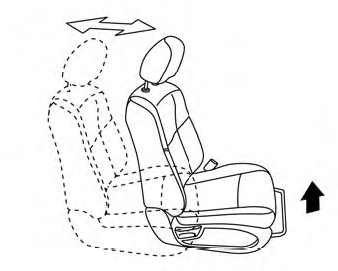
Front manual seat adjustment (if so equipped)
Your vehicle seats can be adjusted manually. For additional information about adjusting the seats, refer to the steps outlined in this section.
Forward and backward