
Nissan Murano: Rear Axle :: Removal and Installation / Rear Wheel Hub

| 1. | Hub cap | 2. | Bushings | 3. | Rear knuckle |
| 4. | Back plate | 5. | Anchor block | 6. | Wheel hub and bearing |
| 7. | Cotter pin (AWD) | A. | Rear wheel hub and bearing bolt | B. | Wheel hub lock nut (AWD) |
| C. | Wheel stud |
REMOVAL
Remove disc brake rotor. Refer to Removal and Installation.
Remove bolt (1) and separate rear wheel sensor from knuckle. Refer to Removal and Installation.
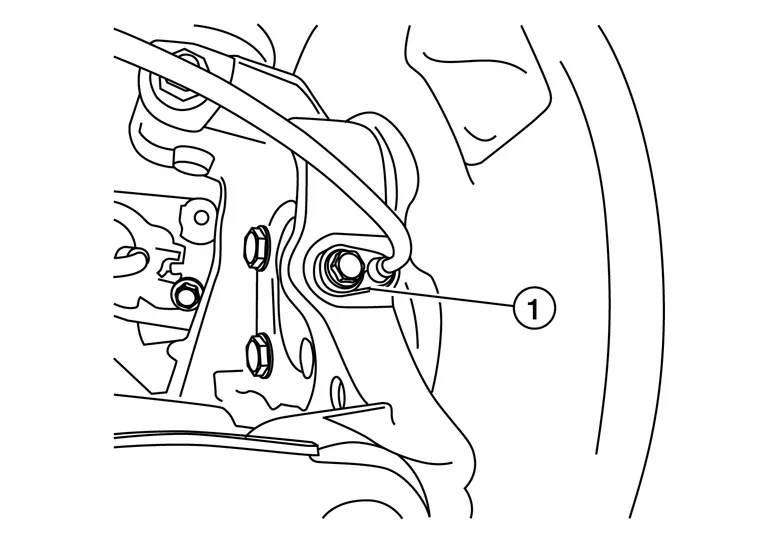
CAUTION:
-
Pull out rear wheel sensor being careful to turn it as little as possible. Do not pull on wheel sensor harness.
-
Failure to remove rear wheel sensor from rear knuckle may result in damage to rear wheel sensor.
For AWD Nissan Murano vehicles, remove cotter pin.
For AWD vehicles, loosen, but do not remove, the wheel hub lock nut from drive shaft using power tool.
For AWD Nissan Murano vehicles, using a piece of wood and a suitable tool, tap on wheel hub lock nut to disengage drive shaft from wheel hub and bearing.

CAUTION:
-
Do not place drive shaft joint at an extreme angle. Be careful not to over-extend slide joint.
-
Do not allow drive shaft to hang without support.
 NOTE:
NOTE:
Use a suitable puller if the drive shaft cannot be separated from wheel hub and bearing.
For AWD Nissan Murano vehicles, remove wheel hub lock nut.
Remove wheel hub and bearing bolts (A).

Remove wheel hub and bearing.
Remove hub cap.
If necessary, remove wheel studs (1) from wheel hub and bearing using a suitable tool (A).
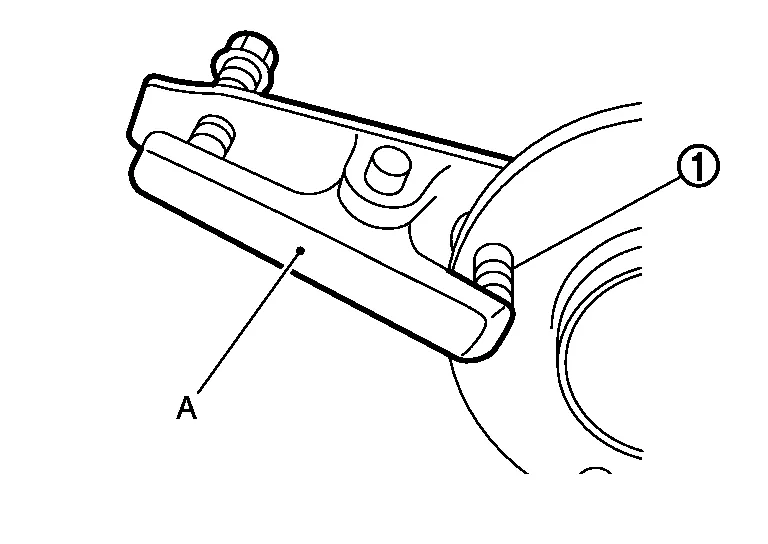
CAUTION:
-
Remove wheel studs only when necessary.
-
Do not hammer wheel studs or damage to wheel hub and bearing may occur.
-
Pull out wheel studs in a direction perpendicular to wheel hub and bearing.
INSPECTION AFTER REMOVAL
Wheel Hub and Bearing
Check wheel hub and bearing for wear, cracks, and damage. Replace wheel hub and bearing if necessary.
Rear Knuckle
Check rear knuckle for wear, cracks, and damage. Replace rear knuckle if necessary.
INSTALLATION
Installation is in reverse order of removal.
CAUTION:
-
Do not use a power tool to tighten wheel hub lock nut.
-
Do not reuse wheel hub lock nut.
-
Place a washer (A) as shown to install wheel studs (1) by using tightening force of nut (B).

CAUTION:
-
Check that there is no clearance between wheel stud and wheel hub and bearing.
-
Do not reuse wheel stud.
-
-
Clean mating surface of wheel hub lock nut and wheel hub and bearing.
-
Clean mating surface of drive shaft and wheel hub and bearing.
-
Make sure wheel hub and bearing operate smoothly.
-
Install rear wheel sensor to rear knuckle. Refer to Removal and Installation.
CAUTION:
-
Before installing, make sure there is no foreign material, such as iron fragments, adhered to pick-up part of rear wheel sensor.
-
When installing, make sure there is no foreign material, such as iron fragments, on and in the hole in rear knuckle for rear wheel sensor. Make sure no foreign material has been caught in sensor rotor. Remove any foreign material and clean mount.
-
-
When installing cotter pin, securely bend cotter pin to prevent rattles.
CAUTION:
Do not reuse cotter pin.

 Rear Drive Shaft
Exploded View
1.
Rear drive shaft
2.
Wheel hub lock nut
3.
Cotter pin
Removal and Installation
REMOVALRemove wheel hub and bearing. Refer to Removal and Installation...
Other information:
Nissan Murano (Z52) 2015-2024 Owners Manual: How to read the displayed lines
Guiding lines which indicate the vehicle width and distances to objects with reference to the vehicle body line are displayed on the monitor. Distance guide lines Indicate distances from the vehicle body. Red line : approx. 0.5m(1.5 ft) Yellow line : approx...
Nissan Murano (Z52) 2015-2024 Service Manual: Battery Saver Output/power Supply Circuit
Component Function Check CHECK INTERIOR ROOM LAMP POWER SUPPLY FUNCTION CONSULT Ignition switch ON. Turn each interior room lamp ON. Personal lamp 2nd row LH Personal lamp 2nd row RH Front room/map lamp assembly Luggage room lamp Vanity lamp LH Vanity lamp RH Select “BATTERY SAVER” in “Active Test” mode of “BCM(BATTERY SAVER)”...
Categories
- Manuals Home
- Nissan Murano Owners Manual
- Nissan Murano Service Manual
- Fuel recommendation
- All-Wheel Drive (AWD) (if so equipped)
- Passenger compartment
- New on site
- Most important about car
Vehicle security system

Your vehicle has two types of security systems:
Vehicle security system NISSAN Vehicle Immobilizer SystemThe vehicle security system provides visual and audible alarm signals if someone opens the doors, liftgate or the hood when the system is armed. It is not, however, a motion detection type system that activates when a vehicle is moved or when a vibration occurs.
