
Nissan Murano: System (intelligent Key System) / Intelligent Key System
SYSTEM DIAGRAM
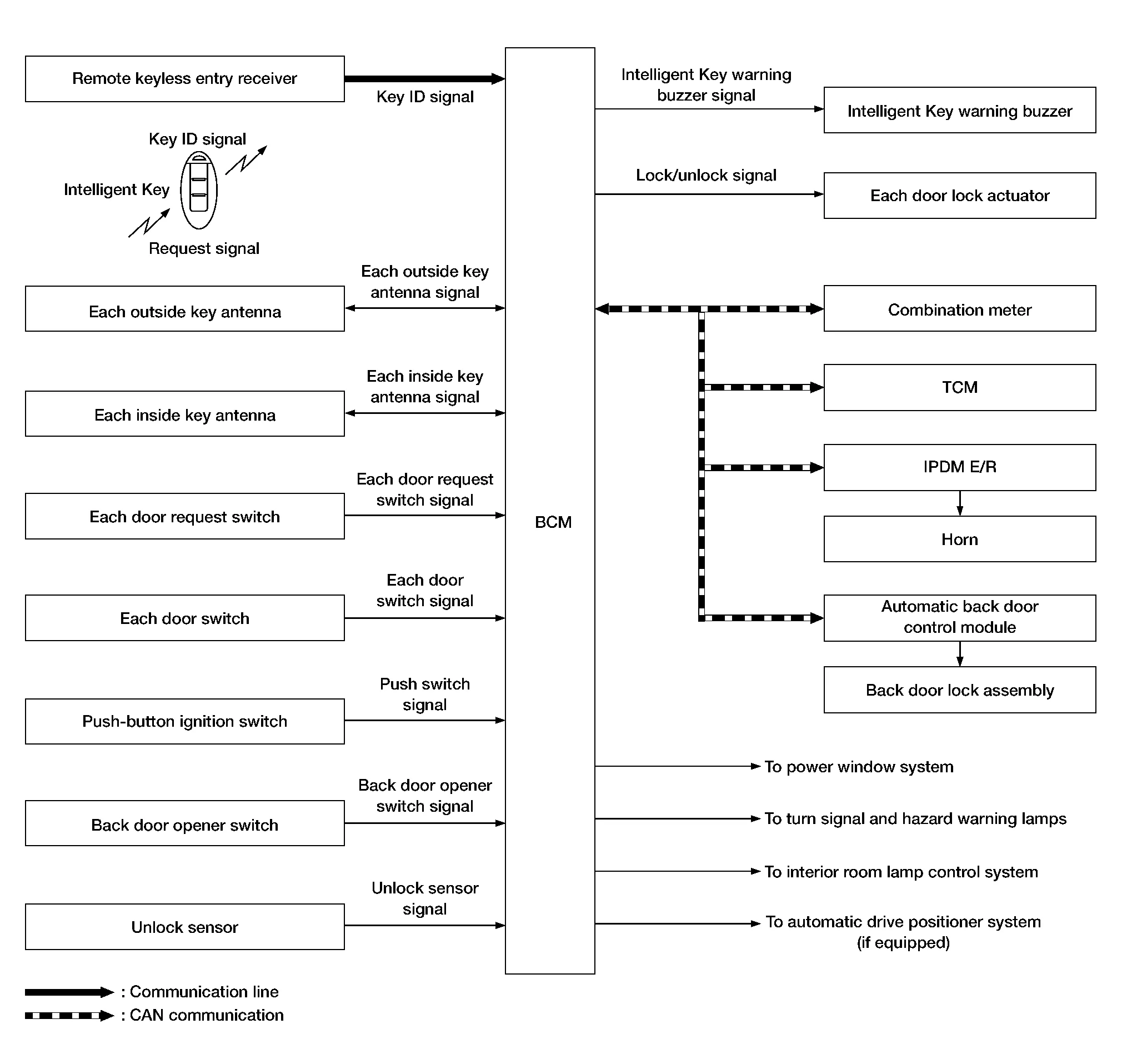
INPUT SIGNAL AND OUTPUT SIGNAL
| Signal name | Input | Output | Description |
|---|---|---|---|
| Key ID signal | Remote keyless entry receiver | BCM | The BCM receives key ID signal inputs and activates the actuators accordingly. |
| Outside key antenna signal | Outside key antenna | BCM | The BCM receives outside key antenna signals inputs and activates the actuators accordingly. |
| Inside key antenna signal | Inside key antenna | BCM | The BCM receives inside key antenna signals inputs and activates the actuators accordingly. |
| Door request switch signal | Door request switch | BCM | The BCM receives door request switch signals inputs and activates the actuators accordingly. |
| Door switch signal | Door switch | BCM | The BCM receives door switch signals inputs and activates the actuators accordingly. |
| Push switch signal | Push-button ignition switch | BCM | The BCM receives push switch signal inputs and activates the actuators accordingly. |
| Back door opener switch signal | Back door opener switch | BCM | The BCM receives back door switch signal inputs and activates the actuators accordingly. |
| Unlock sensor signal | Unlock sensor | BCM | The BCM receives unlock sensor signal inputs and activates the actuators accordingly. |
| Shift position signal | TCM | BCM (CAN) | The BCM receives shift position signal inputs and activates the actuators accordingly. |
| Nissan Murano Vehicle speed signal | Combination meter | BCM (CAN) | The BCM receives Nissan Murano vehicle speed signal inputs and activates the actuators accordingly. |
| Hood switch signal | IPDM E/R | BCM (CAN) | The BCM receives hood switch signals inputs and activates the actuators accordingly. |
SYSTEM DESCRIPTION
-
The Intelligent Key system is a system that makes it possible to lock and unlock the door locks (door lock/unlock function) by carrying the Intelligent Key, which operates based on the results of electronic ID verification using two-way communication between the Intelligent Key and the Nissan Murano vehicle (BCM).
CAUTION:
The driver should always carry the Intelligent Key.
-
The settings for each function can be changed with CONSULT.
-
If an Intelligent Key is lost, a new Intelligent Key can be registered. A maximum of 4 Intelligent Keys can be registered.
-
It is possible to perform a diagnosis on the system and register an Intelligent Key with CONSULT.
-
For initialization and registration of Intelligent Keys, refer to CONSULT Immobilizer mode and follow the on-screen instructions.
| Function | Description | Reference | |
|---|---|---|---|
| Door lock | Lock/unlock can be performed by pressing the request switch. | System Description | |
| Back door open | The back door can be opened by carrying the Intelligent Key and pressing the back door opener switch. | System Description | |
| Remote keyless entry | Lock/unlock can be performed by pressing the remote controller button of the Intelligent Key. | System Description | |
| Key reminder | The key reminder buzzer sounds a warning if the door is locked with the key left inside the Nissan Murano vehicle. | System Description | |
| Warning | If an action that does not meet the operating condition of the Intelligent Key system is taken, the buzzer sounds to inform the driver. | System Description | |
| Remote engine start | The engine can be turned on while carrying the Intelligent Key. | System Description | |
| Interior room lamp control | Interior room lamp is controlled according to door lock/unlock state. | System Description | |
| Panic alarm | When Intelligent Key panic alarm button is pressed, horn sounds. | System Description | |

 Door Lock Function
System Description
SYSTEM DIAGRAMOnly when pressing the door request switch it is possible to lock and unlock the door by carrying the Intelligent Key...
Other information:
Nissan Murano (Z52) 2015-2024 Service Manual: U0428 Steering Angle Sensor
DTC Description DTC DETECTION LOGIC DTC No. CONSULT screen terms (Trouble diagnosis content) DTC detection condition U0428 ST ANGLE SENSOR CALIBRATION (Steering angle sensor calibration) Diagnosis condition When ignition switch is ON Signal (terminal) — Threshold — Diagnosis delay time — POSSIBLE CAUSE Neutral position adjustment of steering angle sensor is not complete Steering angle sensor FAIL-SAFE Predicted course line is not displayed MOD (Moving Object Detection) function is stopped DTC Confirmation Procedure CHECK DTC PRIORITY If DTC U0428 is displayed with DTC U1232, first perform the diagnosis for DTC U1232...
Nissan Murano (Z52) 2015-2024 Service Manual: Normal Operating Condition
Description RELATED TO NOISEThe majority of the audio concerns are the result of outside causes (bad CD, electromagnetic interference, etc.).The following noise results from variations in field strength, such as fading noise and multi-path noise, or external noise from trains and other sources...
Categories
- Manuals Home
- Nissan Murano Owners Manual
- Nissan Murano Service Manual
- Fuel recommendation
- Shift lock release
- Settings
- New on site
- Most important about car
Autolight system

The autolight system allows the headlights to turn on and off automatically. The autolight system can:
Turn on the headlights, front parking, tail, license plate and instrument panel lights automatically when it is dark. Turn off all the lights (except daylight running lights) when it is light. Keep all the lights on for a period of time after you place the ignition switch in the OFF position and all doors are closed.