
Nissan Murano: Hood Lock / Hood Lock
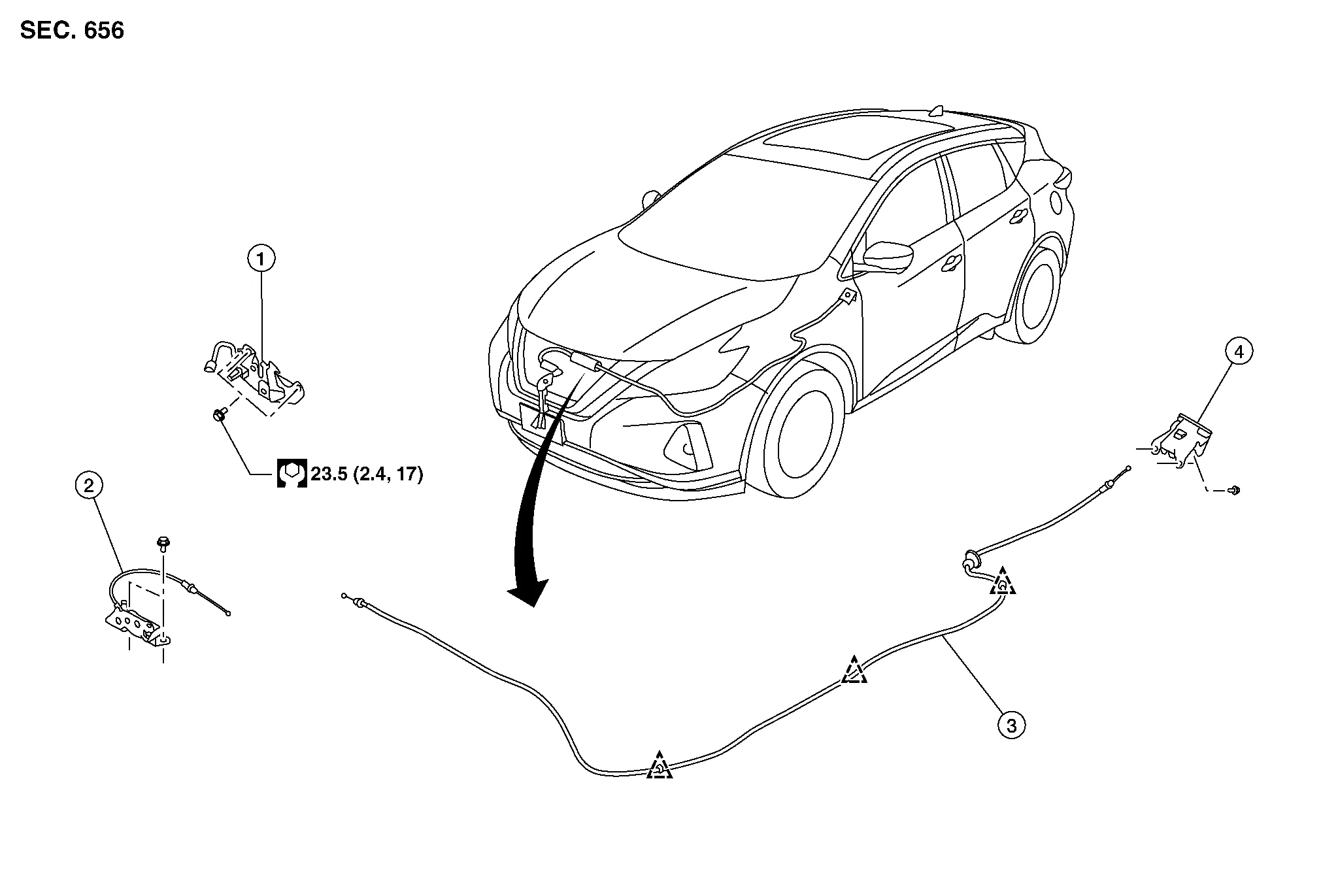
| 1. | Hood lock | 2. | Secondary latch | 3. | Hood lock release cable |
| 4. | Hood lock release handle |  |
Clip |
REMOVAL
Remove core support cover. Refer to Exploded View.
Disconnect hood lock release cable and secondary latch cable from hood lock.
Remove bolts, disconnect the harness connector and remove hood lock.
INSTALLATION
Installation is in the reverse order of removal.
CAUTION:
-
Tighten bolts to specified torque. Refer to Exploded View.
-
Check that hood lock release cable and secondary latch cable are properly engaged with hood lock.
-
After installation, perform hood assembly adjustment procedure. Refer to Adjustment.
-
After adjusting, perform hood lock inspection. Refer to Inspection.
 NOTE:
NOTE:
If hood lock cable is bent or deformed, replace it.
Check that secondary latch is properly engaged with secondary striker with hood’s own weight.
While operating hood lock release handle, carefully check that front end of hood assembly is raised by approximately 20.0 mm (0.79 in). Also check that hood lock release handle returns to original position.
Check that hood lock release handle operates at 49 N (5.0 kg-m, 11.0 ft-lb) or below.
Install so that static closing force of hood is 315-490 N (32.1-50.0 kg–m, 70.8-110.2 ft–lb).
NOTE:
-
Do not exert vertical force on right side and left side of hood lock.
-
Do not press simultaneously on both sides.
Check hood lock lubrication condition. If necessary, apply a suitable multi-purpose grease to hood lock assembly.
 Hood Lock
..
 Secondary Latch
Removal and Installation
REMOVALRemove front grille. Refer to Removal and Installation.
Disconnect secondary latch cable from hood lock assembly.
Remove bolts and secondary latch...
Other information:
Nissan Murano (Z52) 2015-2024 Service Manual: How to Use This Manual. How to Use This Section
Information “CAN” of LAN Section describes information peculiar to a vehicle and inspection procedures. For trouble diagnosis procedure, refer to Trouble Diagnosis Flow Chart of “CAN FUNDAMENTAL”. Abbreviation List Unit name abbreviations in CONSULT CAN diagnosis and in this section are as per the following list...
Nissan Murano (Z52) 2015-2024 Owners Manual: Opening windows
The Intelligent Key allows you to simultaneously open windows equipped with automatic operation. To open the windows, press and hold the button on the Intelligent Key for longer than 3 seconds. The door windows will lower while holding down the button on the Intelligent Key...
Categories
- Manuals Home
- Nissan Murano Owners Manual
- Nissan Murano Service Manual
- Power Steering Fluid (PSF)
- Checking engine oil level
- Fuel recommendation
- New on site
- Most important about car
