
Nissan Murano: Seats / Front power seat adjustment (if so equipped)
Operating tips
- The power seat motor has an autoreset overload protection circuit. If the motor stops during operation, wait 30 seconds then reactivate the switch.
- Do not operate the power seat switch for a long period of time when the engine is off. This will discharge the battery. For additional information, refer to “Automatic drive positioner” in the “Pre-driving checks and adjustments” section of this manual.
Forward and backward
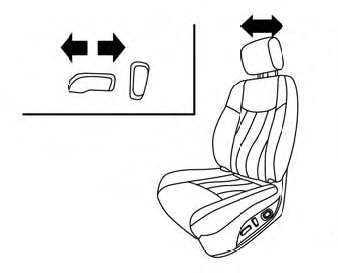
Moving the switch as shown will slide the seat forward or backward to the desired position.
Reclining
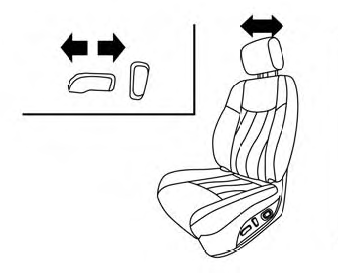
Move the recline switch as shown until the desired angle is obtained.
The reclining feature allows adjustment of the seatback for occupants of different sizes for added comfort and to help obtain proper seat belt fit. For additional information, refer to “Precautions on seat belt usage” in this section. Also, the seatback can be reclined to allow occupants to rest when the vehicle is stopped and the shift lever is in P (Park).
Seat lifter (driver’s seat)
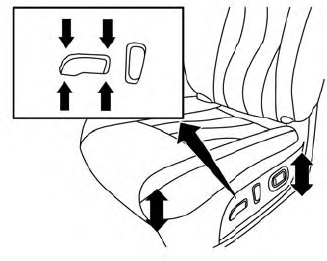
Move the switch as shown to adjust the angle and height of the seat cushion.
Lumbar support (driver’s seat)
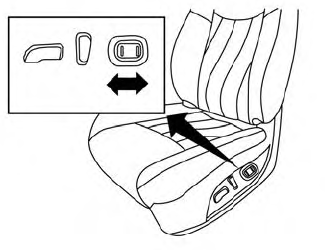
The lumbar support feature provides adjustable lower back support to the driver. Push the switch as shown to adjust the seatback lumbar area.
 Front manual seat adjustment (if so equipped)
Your vehicle seats can be adjusted manually.
For additional information about adjusting
the seats, refer to the steps outlined
in this section.
Forward and backward
Pull the center of the bar up and hold it
while you slide the seat forward or backward
to the desired position...
 Rear bench seat adjustment
Reclining
Pull the reclining strap and
position the
seatback at the desired angle. Release the
reclining strap after positioning the seat at
the desired angle...
Other information:
Nissan Murano (Z52) 2015-2024 Service Manual: Ecu Diagnosis Information. Bcm, Ipdm E/r
..
Nissan Murano (Z52) 2015-2024 Service Manual: Air Mix Door Motor Rh
Diagnosis Procedure CHECK AIR MIX DOOR MOTOR RH POWER SUPPLY Ignition switch ON. Check voltage between air mix door motor RH harness connector and ground. + − Voltage (Approx.) Air mix door motor RH Connector Terminal M156 1 Ground Battery voltage Is the inspection result normal? YES>> GO TO 2...
Categories
- Manuals Home
- Nissan Murano Owners Manual
- Nissan Murano Service Manual
- GAS STATION INFORMATION
- Indicator lights
- Power Steering Fluid (PSF)
- New on site
- Most important about car
Seatback pockets

Theremaybe one or two seatback pockets located on the back of the driver and passenger seats. The pockets can be used to store maps.
WARNING
