
Nissan Murano: Automatic Drive Positioner :: Removal and Installation / Driver Seat Control Unit
Nissan Murano (Z52) 2015-2024 Service Manual / Body Interior / Automatic Drive Positioner :: Removal and Installation / Driver Seat Control Unit
REMOVAL
Remove the driver seat. Refer to Removal and Installation.
Remove the two driver seat control unit (1) screws (A).
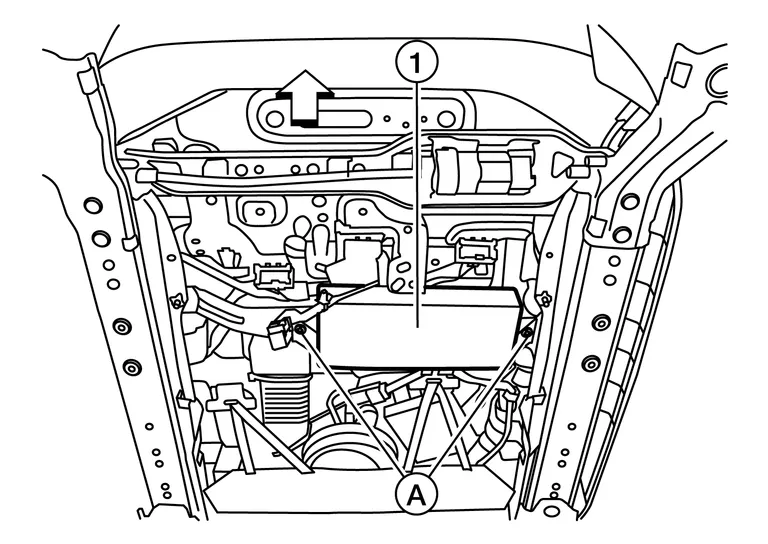
 : Front
Disconnect the two harness connectors from driver seat control unit.
Remove driver seat control unit.
INSTALLATION
Installation is in the reverse order of removal.
CAUTION:
After installing the driver seat, perform additional service when replacing control unit. Refer to Description.

 Automatic Drive Positioner Control Unit
Removal and Installation
REMOVALRemove the instrument lower panel LH. Refer to Removal and Installation.
Disconnect the two harness connectors from the automatic drive positioner control unit (1) and remove...
Other information:
Nissan Murano (Z52) 2015-2024 Service Manual: Preparation. Preparation
..
Nissan Murano (Z52) 2015-2024 Service Manual: B2630 Sunload Sensor
DTC Description DTC DETECTION LOGIC DTC No. CONSULT screen terms (Trouble diagnosis content) DTC detection condition B2630 SUNLOAD SENSOR (SHORT) (Sunload sensor) Diagnosis condition When ignition switch is ON. Signal (terminal) - Threshold Detected calorie at sunload sensor 1395 w/m2 (1200 kcal/m2·h) or more Diagnosis delay time - POSSIBLE CAUSE Sunload sensor A/C auto amp...
Categories
- Manuals Home
- Nissan Murano Owners Manual
- Nissan Murano Service Manual
- All-Wheel Drive (AWD) (if so equipped)
- Tire rotation
- Checking engine oil level
- New on site
- Most important about car
Unfastening the seat belts. Checking seat belt operation
Unfastening the seat belts

To unfasten the seat belt, press the button
on the buckle  . The seat belt
automatically
retracts.
. The seat belt
automatically
retracts.

Copyright © 2026 www.nimurano.com